Configuration
System Setup
On initial setup the thermostat will enter the ISU menu. If entering the ISU menu after initial setup, follow the steps below:
-
Press and hold the bottom left button and Up arrow
 button for 5 seconds to access the INSTALLER SETUP (ISU).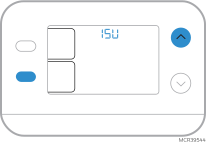
-
The ISU number is on the left. The ISU setting is on the right.
When an ISU number is displayed, press
or  to change the setting.
 -
After choosing the correct setting for an ISU, press NEXT to advance to the next ISU setting.
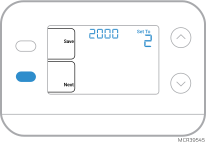
-
To finish setup, press the SAVE button.
Installer Setup Options (ISU)
Note: Depending on system settings, not all options may be available.
|
# ISU |
ISU Name |
ISU Options (factory defaults are bold) |
||
|---|---|---|---|---|
|
1050 |
Temperature Indication Scale |
|
||
|
2000 |
Heating System Type |
1 = Conventional Forced Air Heat 2 = Heat Pump 3 = Radiant Heat 5 = None (Cool Only) |
||
|
If you are unsure what type of system you have, refer to your heating/cooling system equipment literature or call an HVAC professional. If you select the wrong system type, the thermostat will not operate the equipment as intended. |
||||
|
2010 |
Heating Equipment Type |
Conventional Forced Air Heat: 1 = Standard Efficiency Gas Forced Air 2 = High Efficiency Gas Forced Air 3 = Oil Forced Air 4 = Electric Forced Air 5 = Hot Water Fan Coil (ISU 2010 not shown when 2000 = Heat Pump) Radiant Heat: 9 = Hot Water Radiant Heat 12 = Steam |
||
|
2060 |
Reversing Valve O/B |
0 = O (O/B in Cool. O wire is connected to the O/B terminal and controls cooling.) 1 = B (O/B on Heat. B wire is connected to the O/B terminal and controls heat.) The literature that came with your heat pump equipment should indicate whether the reversing valve is energized in Heat or Cool mode. |
||
|
2070 |
Cool Stages/ Compressor Stages |
0, 1 |
||
|
2071 |
Heat Stages |
Heat Stages: 1 |
||
|
3000 |
System Changeover |
0 = Hidden (Manual only) 1 = Enabled (Automatic available. In Auto mode, the thermostat automatically switches between heating and cooling to maintain the desired indoor temperature. This option is not recommended if the outdoor temperature often stays below 50°F [10°C] during winter months.) |
||
|
4103 |
Minimum Heat Setpoint |
32 °F to 50 °F (Default is 40 °F) 0 °C to 10.0 °C (Default is 4.5 °C) Do not set this lower than 40°F/4.5°C unless installed in a location where pipes are not at risk of freezing. |
||
|
7110 |
Air Filter Replacement Reminder (Run Time only counts the time that Heat, Cool or Fan are running) |
|
||
|
14005 |
Idle screen selection |
0 - Minimum Information shown 2 - Maximum display information shown |
||
System Operation Settings
-
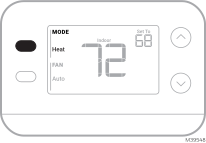
Press the MODE button to cycle to the next available System mode
-
Cycle through the modes until the desired System mode is displayed
Available System modes vary with system settings.
System modes:
-
AUTO
-
HEAT
-
COOL
-
OFF
Fan Operation Settings
-
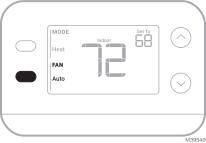
Press the FAN button to cycle to the next available Fan mode
-
Cycle through the modes until the desired Fan mode is displayed
Available Fan modes vary with system settings.
Fan modes:
-
AUTO: Fan runs only when the heating or cooling system is on
-
ON: Fan is always on
-
CIRC: Fan runs about 33% of the time to circulate air.
Built-in Compressor Protection
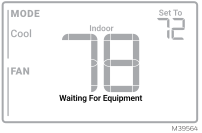
Damage can occur if your system’s compressor is restarted too soon after shutdown. This feature forces the compressor to wait for a few minutes before restarting. During the wait time, the display will show the message Waiting For Equipment under the room temperature reading.
When the safe wait time has elapsed, the message disappears, and the thermostat will show “Heat on” or “Cool on”.